Novedades

Mantente al día con los últimos lanzamientos, mejoras y correcciones.

Sigue a @NotionHQ

Ask your agent to suggest edits

Your agents can now propose changes instead of making them directly. Ask your agent to suggest edits, then move top to bottom to approve each one. It’s great when you need line-level changes, like a pass for grammar.

Get started by asking your agent to “suggest edits.”

Your Developer Portal, now in the sidebar

Manage your Workers, connections, and personal access tokens from the new Developer section of your Notion workspace. See an overview of deployed Workers and logs behind every run.

Developer sidebar section

Plus, the new developer bar makes it easy for anyone building with the API to find IDs for the page, database, block, workspace, or user. Copy any one of them, or the full API object, in one click.

Developer bar

Get started from SettingsDeveloperEnable developer features. Go there now →

Model selection, simplified

No more guessing which model to use.

The model picker now leads with a shortlist of models made for your hardest tasks, and every model has a scorecard to compare speed, intelligence, and cost. Pin your favorites for easy access and dial up the effort when you need a more thorough answer.

AI Meeting Notes can now trigger Custom Agents

Custom Agents can now run right after an AI Meeting Note is finished. No more need to manually update status trackers, post recaps to the project channel, or file tickets by hand.

Here’s a few of our favorite post-meeting workflows:

  • Update your project tracker with the latest status

  • Post a recap to Slack or email with decisions and next steps

  • Turn feedback into tickets for your engineering team

To get started, open your Custom Agent’s settings, add the Meeting note summarized trigger, and choose which meetings kick it off. After your next call, your agent will get to work.

High contrast mode

Accessibility win! High contrast mode is a new display option that makes text, icons, and borders easier to read.

Try it by going to Settings > Preferences > Appearance. Available on desktop and web.

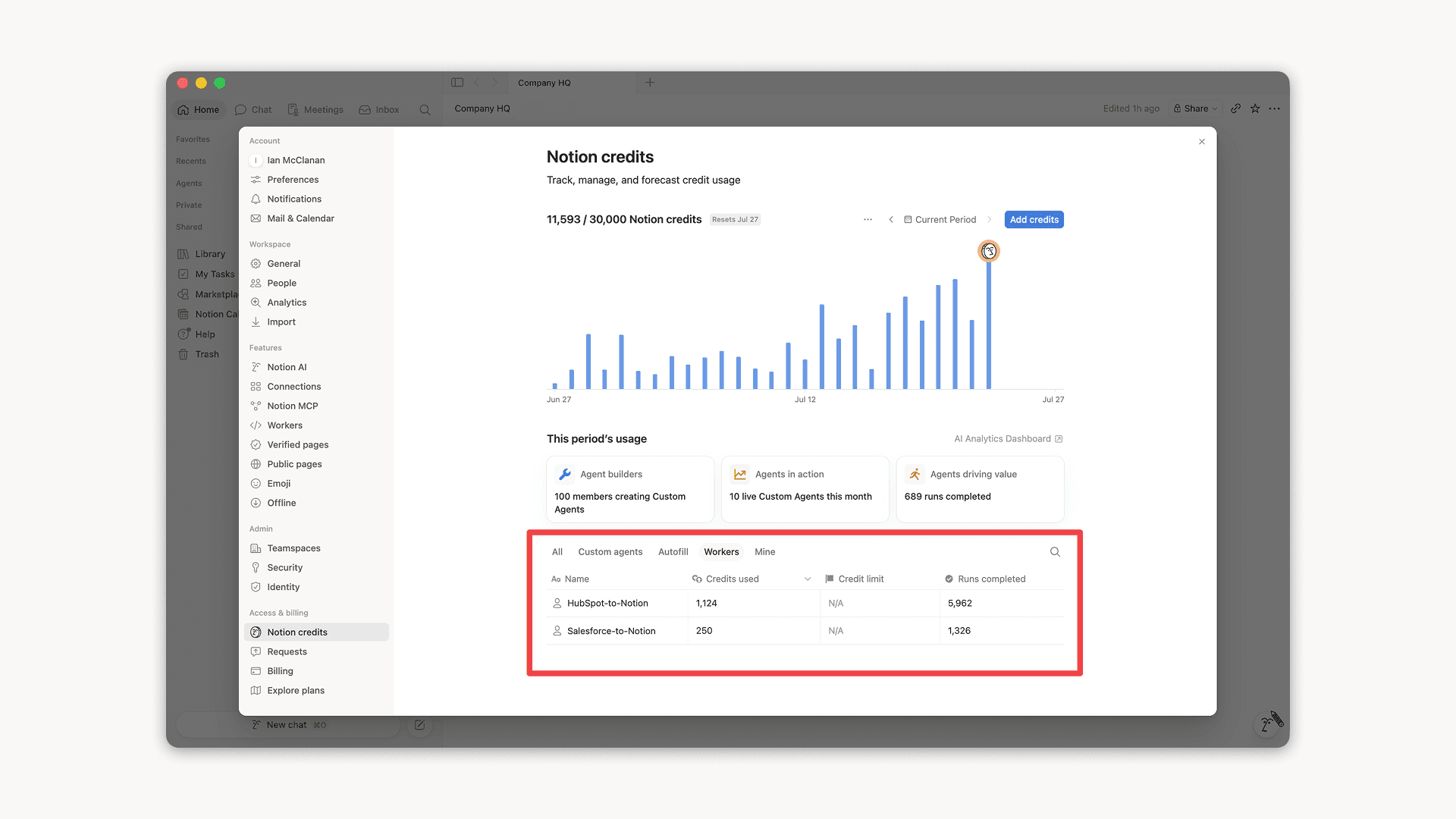
Workers, now in your Notion credits dashboard

Workers in the credits dashboard

Notion Workers run custom code on Notion's infrastructure to sync data, power tools for Custom Agents, and trigger webhook automations.

Now you can track your Workers’ usage in the credits dashboard, alongside your other spend.

Workers are free to try during the beta on Business and Enterprise plans (including Business trials). Usage is now visible in the dashboard to help your team size credits before the beta ends.

Learn more about the Notion Workers beta and pricing in our Help Center

Nuevas herramientas del calendario para tu agente

Tu agente acaba de recibir nuevas herramientas del calendario para mostrar y gestionar tu agenda. Únete a llamadas, envía invitaciones y encuentra horarios que funcionen para todos, todo desde el chat.

Intenta preguntarle a tu agente:

  • ¿Qué tengo en mi agenda para hoy?

  • Mueve mi reunión con Sandra a la 1 p. m.

  • Crea un enlace de programación para mañana entre las 2:00 p. m. y las 5:00 p. m.

Para comenzar, pídele a tu agente que “Conecte tu calendario” o ve a ConfiguraciónConexiones. Disponible en la versión de escritorio. ¡Pronto también estarán disponibles en tu celular!

Comparte los workers de Notion con todo tu equipo

Ahora puedes compartir tus workers de Notion.

Crea e itera workers junto con tu equipo. O comparte uno para que tus compañeros de equipo puedan conectarlo a sus propios agentes personalizados. Imagina un worker para Salesforce, creado por un único miembro del equipo, que ahora impulsa a los agentes de tus equipos de ventas y marketing.

Puede conectar permite que tus compañeros de equipo usen tu worker, mientras que Acceso completo les permite mejorarlo o adaptarlo para resolver nuevos casos de uso.

Para comenzar, accede al Portal para desarrolladores en ConfiguraciónConexionesIr al Portal para desarrolladores, o visita app.notion.com/developers.

Te presentamos la app de Agentes de Notion para iOS

Tus agentes favoritos ahora caben en tu bolsillo. Haz que trabajen desde cualquier lugar.

Prepárate para tu próxima reunión mientras aún estás en el ascensor. Registra una idea mientras caminas y deja que tus agentes den el siguiente paso incluso antes de que vuelvas a tu escritorio.

Tus ideas no esperan el momento perfecto. Deja que tus agentes se encarguen del resto.

Powered by Fruition