새로운 기능

최신 릴리스, 개선 사항 및 수정 사항을 확인하세요.

@NotionHQ 팔로우하기

Ask your agent to suggest edits

Your agents can now propose changes instead of making them directly. Ask your agent to suggest edits, then move top to bottom to approve each one. It’s great when you need line-level changes, like a pass for grammar.

Get started by asking your agent to “suggest edits.”

Your Developer Portal, now in the sidebar

Manage your Workers, connections, and personal access tokens from the new Developer section of your Notion workspace. See an overview of deployed Workers and logs behind every run.

Developer sidebar section

Plus, the new developer bar makes it easy for anyone building with the API to find IDs for the page, database, block, workspace, or user. Copy any one of them, or the full API object, in one click.

Developer bar

Get started from SettingsDeveloperEnable developer features. Go there now →

Model selection, simplified

No more guessing which model to use.

The model picker now leads with a shortlist of models made for your hardest tasks, and every model has a scorecard to compare speed, intelligence, and cost. Pin your favorites for easy access and dial up the effort when you need a more thorough answer.

AI Meeting Notes can now trigger Custom Agents

Custom Agents can now run right after an AI Meeting Note is finished. No more need to manually update status trackers, post recaps to the project channel, or file tickets by hand.

Here’s a few of our favorite post-meeting workflows:

  • Update your project tracker with the latest status

  • Post a recap to Slack or email with decisions and next steps

  • Turn feedback into tickets for your engineering team

To get started, open your Custom Agent’s settings, add the Meeting note summarized trigger, and choose which meetings kick it off. After your next call, your agent will get to work.

High contrast mode

Accessibility win! High contrast mode is a new display option that makes text, icons, and borders easier to read.

Try it by going to Settings > Preferences > Appearance. Available on desktop and web.

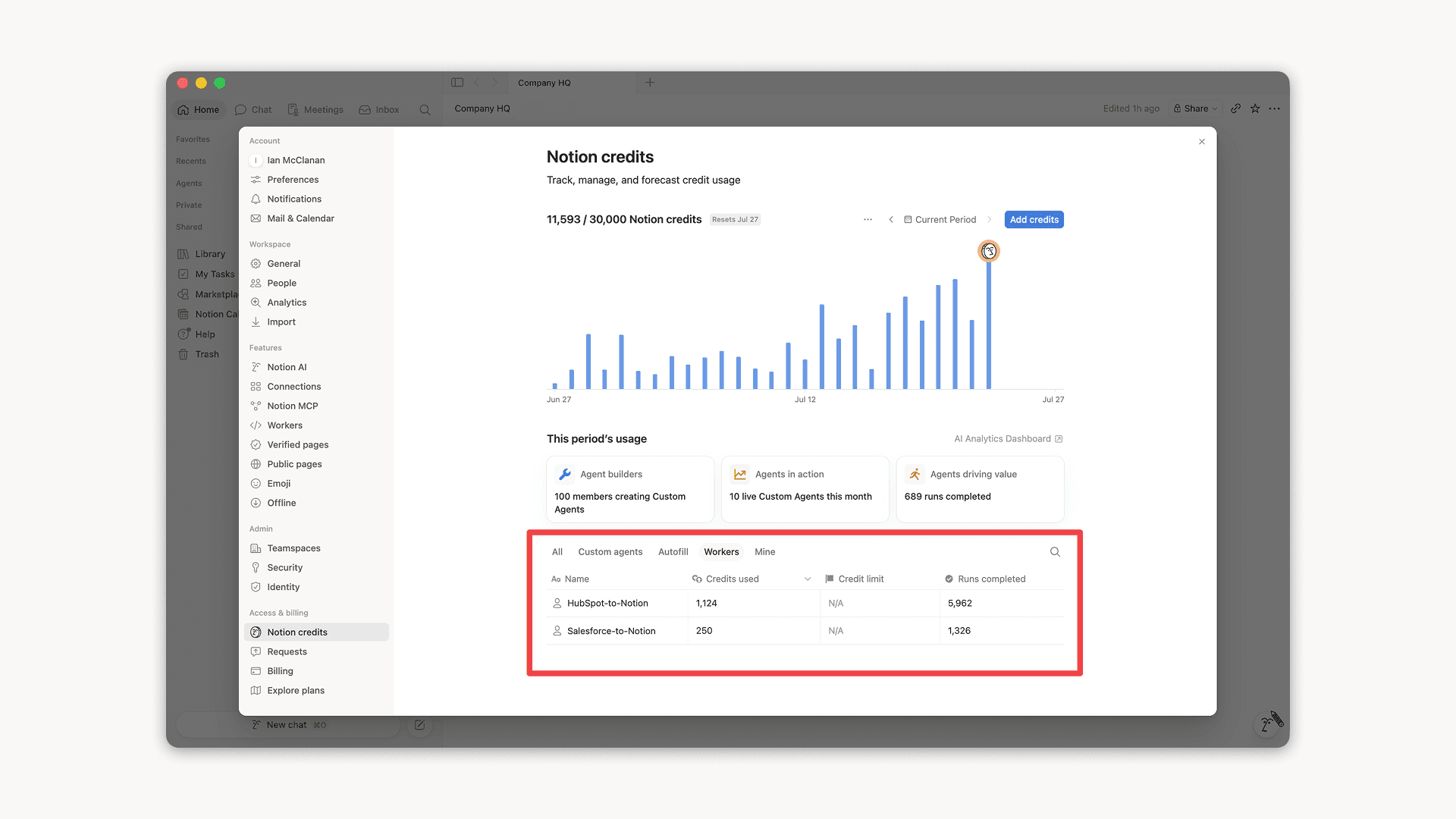
Workers, now in your Notion credits dashboard

Workers in the credits dashboard

Notion Workers run custom code on Notion's infrastructure to sync data, power tools for Custom Agents, and trigger webhook automations.

Now you can track your Workers’ usage in the credits dashboard, alongside your other spend.

Workers are free to try during the beta on Business and Enterprise plans (including Business trials). Usage is now visible in the dashboard to help your team size credits before the beta ends.

Learn more about the Notion Workers beta and pricing in our Help Center

새로운 에이전트용 캘린더 도구

이제 에이전트가 일정을 표시하고 관리할 수 있는 새로운 캘린더 도구를 사용할 수 있게 되었습니다. 회의 참가, 초대장 전송, 모두에게 적합한 시간 확인 등 다양한 작업을 채팅에서 간편하게 수행하세요.

에이전트에게 다음과 같이 질문 또는 요청해 보세요.

  • '오늘 나는 어떤 일정을 수행해야 하나요?'

  • '김예지 님과의 회의를 오후 1시로 옮겨 주세요.'

  • '내일 오후 2시~5시 사이에 대해 일정 잡기 링크를 생성해주세요.'

에이전트에게 '캘린더를 연결'해 달라고 요청하거나 설정연결로 이동하여 시작하세요. 데스크톱에서 사용 가능합니다. 모바일 버전도 곧 출시 예정입니다!

팀원 모두와 Notion Workers 공유하기

이제 Notion Workers와 공유할 수 있습니다.

팀원과 함께 Workers를 구축하고 지속적으로 개선하세요. 또는 팀원이 자신의 커스텀 에이전트에 연결할 수 있도록 공유하세요. 한 명의 팀원이 구축한 Salesforce Worker가 이제 영업팀과 마케팅팀 전체의 에이전트를 지원한다고 상상해 보세요.

연결 가능을 통해 팀원이 회원님의 Worker를 사용할 수 있으며, 모두 허용을 통해 팀원은 Worker를 개선하거나 새로운 문제에 적용할 수 있습니다.

개발자 포털에서 설정연결개발자 포털로 이동을 통해 시작하거나 app.notion.com/developers를 방문하세요.

Notion Agents iOS 앱 소개

이제 언제 어디서나 좋아하는 에이전트와 함께할 수 있습니다. 에이전트를 더욱 간편하게 활용해 보세요.

회의실에 들어가기 전, 미리 회의 준비를 마칠 수 있어요. 산책 중에 아이디어를 기록하고, 자리를 비운 동안 에이전트가 다음 단계를 진행하도록 맡겨두세요.

번뜩이는 아이디어는 잊기 전에 기록하세요. 나머지는 에이전트에 맡기세요.

Powered by Fruition