Notionサポートによるアクセスを許可または削除する
Notionサポートチームの助けが必要なときに、アクセスを許可または取り消す方法をご案内します。
よくあるご質問(FAQ)に移動Notionサポートがお客様のアカウントやワークスペースのデータにアクセスできるのは、お客様がサポートへのお問い合わせを行い、アクセスを許可した後に、問題のトラブルシューティングやコンテンツの復旧を行う場合のみです。Notionサポートができることを制御する設定は2つあります。それぞれの設定手順は以下の通りです。
Notionがワークスペースのデータにアクセスすることを許可します。
NotionサポートがNotion内であなたとして操作することを許可します。
これら2つの設定はそれぞれ独立しています。一方をオンにしても、もう一方がオンになることはありません。問題の内容に応じて、サポートから一方または両方の設定をオンにするよう依頼される場合があります。
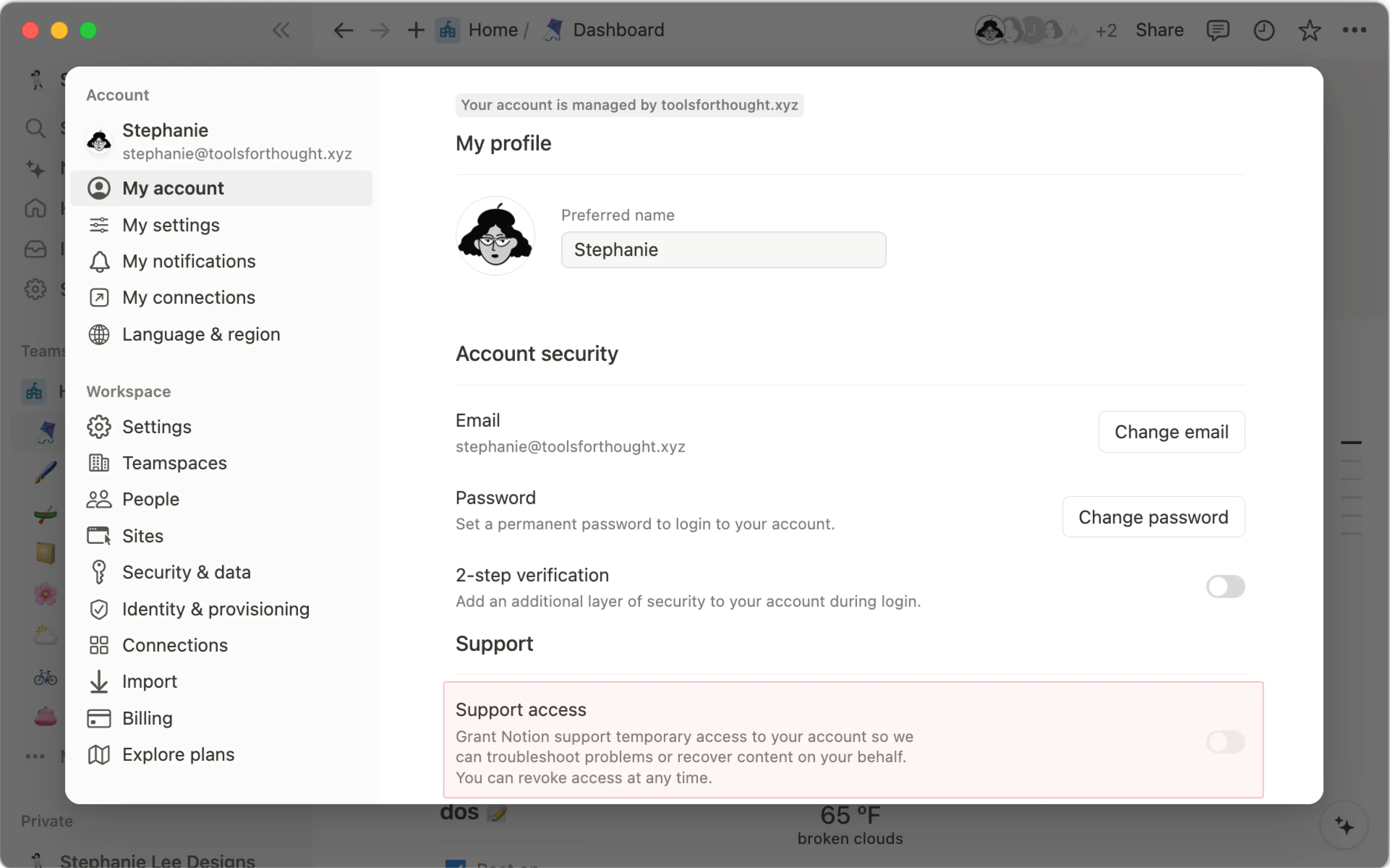
この設定は、個人のアカウントに対するものです。Notionサポートがあなたとして操作を行い、報告された問題をトラブルシューティングできるようにします。
Notionサポートチームは、メールやアプリ内チャットを通してやり取りする際に、トラブルシューティングや復旧のサポートを目的としたお客様のアカウントへのアクセス許可を求めることがあります。アカウントへのアクセスを許可する手順は以下の通りです。
サイドバーの
設定→{あなたの名前}の順に移動します。サポートでサポートアクセスをオンに切り替えます。
アカウントへのアクセスを取り消す
アクセスを付与した後、Notionサポートチームは28日間、またはあなたがこのアクセスを取り消すまで、あなたのコンテンツにアクセスする権限を持ちます。この期間はアプリ内で表示されます。いつでもアカウントへのアクセスを取り消すには、以下の手順を行ってください。
サイドバーの
設定→{あなたの名前}の順に移動します。サポートでサポートアクセスをオフに切り替えます。
Notionのモバイルアプリでサポートアクセスの許可または取り消しを行う手順は以下の通りです。
モバイルでNotionを開き、
•••をタップします。設定をタップします。サポートアクセスのオン・オフを切り替えます。
ワークスペースの管理者およびワークスペースオーナーは、サポートやトラブルシューティングのためにNotionがワークスペースにアクセスできるかどうかを決定できます。この設定は、上記の個人設定とは別です。個人設定では、Notionサポートがあなたとして操作できるようになります。ワークスペース設定では、Notionサポートが問題解決を支援するためにワークスペースにアクセスできるようになります。
ワークスペースへのアクセスをオンにしても、Notionサポートが特定の個人として操作できるようになるわけではありません。サポートが特定の個人として操作する必要がある場合は、その個人もアカウントへのアクセスをオンにする必要があります。
サイドバーの
設定→セキュリティ対策の順に開きます。サポートアクセスのトグルをオンに切り替えます
アクセスはデフォルトで28日後に自動的に終了します。いつでも再度有効にすることができます。
サイドバーの
設定→セキュリティ対策の順に開きます。サポートアクセスのトグルをオフに切り替えます。
ワークスペースのデータへのアクセスが付与、変更、または終了されるたびに、監査ログに記録されます。
ワークスペースがエンタープライズ組織の一部である場合、組織管理者は組織設定からこの設定を管理できます。管理者は以下の操作が可能です。
組織内のすべてのワークスペースに対して1つのポリシーを設定する。
各ワークスペースのポリシーを個別に設定する。
この設定を管理するには:
サイドバーで組織名を選択し、
組織の管理を選択します。組織設定で
セキュリティ対策を選択します。ワークスペースサポートアクセスへの同意を見つけて選択します。組織全体の設定を選択するか、リスト内の各ワークスペースの設定を選択します。
各ワークスペースは、以下のいずれかに設定できます。
有効: Notionサポートがそのワークスペースのデータへのアクセスが可能です。ワークスペース側でこれをオフにすることはできません。無効: Notionサポートはそのワークスペースのデータへのアクセスができません。ワークスペース側でこれをオンにすることはできません。
組織の設定が常に優先されます。組織が 有効 または 無効 に設定されている場合、各ワークスペースの設定に関係なく、その選択がすべてのワークスペースに適用されます。各ワークスペースで個別に決定できるようにするには、組織の設定を ワークスペース管理 に設定してください。
組織がこの設定をオフにすると、ワークスペースの切り替えスイッチはロックされ、アクセスはオフのままになります。組織が後で再度オンにした場合、ワークスペースの以前の選択が復元されます。
組織は、ユーザーによるアカウントへのサポートアクセス許可 設定を使用して、メンバーが自分のアカウントのサポートアクセスを有効にすることを制限できます。この設定がオフの場合でも、組織のオーナーは特定のユーザーのサポートアクセスを有効にすることができます。これを行うには、以下の手順に従います。
サイドバーで組織名を選択し、
組織の管理を選択します。組織設定で
ユーザーを選択します。メンバーを管理を見つけて選択します。Notionサポートの助けが必要なユーザーを見つけて選択します。
一般タブで、サポートアクセスを許可のドロップダウンを選択し、そのアカウントのサポートアクセスをオンにします。
すべてのサポートアクセスと同様に、これはそのユーザーが報告した問題についてのみNotionサポートが支援できるようにするものであり、いつでもオフにできます。
よくあるご質問(FAQ)
この設定がオンの場合、Notionは何ができますか?
この設定がオンの場合、Notionは何ができますか?
この設定により、Notionサポートは、ページの修正や問い合わせのあったコンテンツの復元など、ユーザーを支援するためにワークスペースのデータにアクセスできるようになります。Notionは、ユーザーの許可なく何かを見たり変更したりすることはありません。サポートがデータを確認したり修正を実行したりする前に、その特定の操作を承認するようユーザーに求めます。
この設定をオンにした覚えがありません。なぜオンになっているのですか?
この設定をオンにした覚えがありません。なぜオンになっているのですか?
この設定は以前、各ワークスペースオーナーの個人サポートアクセスと連動していました。オーナーの誰かがサポートアクセスをオンにすると、Notionサポートがそのワークスペースをサポートできるようになっていました。
ワークスペースへのアクセスは、個別の設定になりました。オーナーがすでにサポートアクセスをオンにしていた場合、ワークスペースの設定もそれに合わせてオンになり、終了日も同じに設定されました。Notionと新しく共有された情報はありません。設定 → セキュリティ対策からいつでもオフにできます。
ワークスペースへのアクセスは誰がオンにできますか?
ワークスペースへのアクセスは誰がオンにできますか?
ワークスペースの管理者とオーナー。エンタープライズ組織では、組織管理者も組織コンソールから管理できます。
アカウントへのアクセスは永続的にオンのままですか?
アカウントへのアクセスは永続的にオンのままですか?
辞退。アカウントへのアクセスは、/デフォルトで28日後に自動的に終了します。必要なときにいつでも再度オンにできます。
組織オーナーは、特定の1人に対してのみサポートアクセスをオンにできますか?
組織オーナーは、特定の1人に対してのみサポートアクセスをオンにできますか?
承諾。組織オーナーは、組織コンソールから特定の個人のアカウントに対してサポートアクセスをオンにできます。これは、メンバー自身がオンにできない場合でも機能します。
ワークスペースへのアクセスがオンの場合、Notionサポートは私として操作できますか?
ワークスペースへのアクセスがオンの場合、Notionサポートは私として操作できますか?
辞退。ワークスペースへのアクセスとアカウントへのアクセスは別個のものです。それぞれ個別にオンにする必要があります。